If you want to know how to make a phone app in 2026 without learning Swift or Kotlin first, the honest answer is shorter than most guides admit. You describe the app, an AI builder writes it, you test it at phone size, publish it, and then package it for Android and iOS. The part nobody skips is the store hand-off: a $99 a year Apple account, a $25 Google Play account, and a review in each store. This guide walks through every step, compares the five real ways to build a phone app with prices we checked on November 22, 2026, and shows a booking app we built today from a single prompt.
Quick Answer
To make a phone app without coding: (1) write down the one job the app does, (2) describe it in plain English to an AI app builder such as Totalum, (3) test and fix it at phone size, (4) publish it, (5) ask the builder to "make it work as a mobile app", (6) build the Android (APK or AAB) and iOS (IPA) packages, and (7) submit them with your own Apple Developer ($99/year) and Google Play ($25 one-time) accounts. On Totalum, the mobile builds need a paid plan (Starter is $29/month) and the app is a native shell that opens your published web app, not a fully native UI. For most booking, CRM, tracker and client-portal apps, that trade-off is fine.
Build your phone app from one prompt: start on Totalum.
The 5 ways to make a phone app (compared, checked November 22, 2026)
There are five real paths. They differ in what ends up on the phone, how much you need to know, and what you pay before the store fees.
| Path | Example tools | What ends up on the phone | Starting price (checked Nov 22, 2026) | Source |
|---|---|---|---|---|
| Native code | Swift in Xcode (iOS), Kotlin in Android Studio | Fully native app per platform | Tools are free; iOS builds need a Mac | Apple Xcode, Android Developers |
| Cross-platform code | React Native, Flutter | Native apps for both platforms from one codebase | Frameworks are free and open source; you need to code | React Native, Flutter |
| Visual no-code mobile builders | FlutterFlow, Bubble | Native mobile apps you assemble visually | FlutterFlow Basic $39/month (APK download and one-click store deployment included); Bubble Starter $32/month billed annually for web, with separate mobile plans | FlutterFlow pricing, Bubble pricing |
| Web-first AI builders | Lovable, Base44 | A web app; phone packaging varies by tool | Lovable Pro 25/month (shown as €25 on our EU view), 100 credits; Base44 Starter $16/month billed annually, 100 message credits | Lovable pricing, Base44 pricing |
| AI builder with Android and iOS builds | Totalum | A native shell that opens your published app, built as APK/AAB and IPA | Starter $29/month, 250 credits; Android and iOS on every paid plan | Totalum mobile docs |
A few notes on the table. Neither the Lovable nor the Base44 pricing page mentions mobile builds. Base44's own guide on making a mobile app says most AI-generated mobile apps run as "a lightweight wrapper around your web app rather than a fully native build". That is true of Totalum as well, and we say so plainly below. FlutterFlow is the strongest option in this table if you need fully native screens and are willing to learn a visual editor. Native code and cross-platform code remain the right call for games, heavy offline use, Bluetooth hardware and anything that leans hard on the phone's sensors.
How to make a phone app, step by step
This is the path for founders, small businesses and side-project builders who want a working app on their phone this week, not a course in mobile development.
1. Write down the one job your app does
Most first apps fail because they try to do six things. Write one sentence: "Guests book a cabin for specific nights and see their trips." Then list the screens a user touches to do that job, usually three to six. That list becomes your prompt.
2. Describe the app in one detailed prompt
Name the users, the screens, the data and the rules. Rules are what make an app real: "booked dates are blocked for everyone else" and "each user can only see their own bookings" are the lines that separate a demo from something you can ship. Add "mobile-first" so the layout starts from a phone screen. You can see the exact prompt we used in the build section below.
3. Test it at phone size and fix with follow-ups
Open the preview in your phone's browser, or shrink your desktop browser to phone width. Tap every button with your thumb. Then send short follow-up prompts for what feels wrong: "make the check buttons bigger and move them to the bottom of the screen" is a perfectly good instruction. In an earlier test of ours, one follow-up like that took 7.8 minutes.
4. Publish the web app
On Totalum, the phone app opens your published site, so publishing comes before any mobile build. Publishing also gives you a link to share with testers before you touch the app stores.
5. Ask the builder to "make it work as a mobile app"
This prompt makes the app installable from the browser: an install button on Android, Add to Home Screen steps on iPhone, and an offline page. For many internal tools and client portals, this is already enough, and it costs nothing in store fees.
6. Build the Android and iOS packages
On a paid plan you then create the mobile builds from the same project. Android builds come out as a debug APK, a release APK or an AAB (the format Google Play wants). iOS builds come out as a simulator app, which needs no Apple account, or a signed IPA for TestFlight. Each build reserves 13.3 credits, is settled on the real build time and is refunded if it fails. Totalum allows one build per project per hour, and you can plug in your own Codemagic token to skip the queue. The full reference is in the Totalum mobile docs.
7. Open your store accounts and sign the apps
You publish under your own name or company. Apple charges a $99 annual membership for the Apple Developer Program, and Google charges a US$25 one-time registration fee for a Play Console account. Signed builds need your signing keys. Keep them somewhere safe, because losing an Android upload key is painful to fix.
8. Send the builds to the stores and promote them
With "send to stores on publish" turned on, every publish rebuilds the signed apps and uploads them to the Google Play internal track and to TestFlight, up to 10 store uploads a day. Moving a build from testing to production stays your step in each store console. Our guide to publishing an AI app to the App Store and Google Play covers the review rules that catch first-time submitters, including Google's closed testing requirement for new personal accounts and Apple's minimum functionality guideline.
What we built today: a booking app from one prompt
On November 22, 2026, we built "Burrow", an Airbnb-style vacation rental app, on a Totalum test account and recorded the whole session. This is what happened, with the numbers from the builder's own result card.
The prompt, typed once with no follow-ups:
"Build an Airbnb-style vacation rental app called Burrow. Guests sign up with email, browse stays with photos, price per night and location, pick dates on a calendar and book; booked dates are blocked for everyone else. Hosts sign up, add listings with photos and see their bookings in a dashboard. Show a booking confirmation page. Each user can only see their own bookings. Start it with 6 sample stays with photos so the browse page isn't empty. Forest green and cream colors, mobile-first."
- Time: 11 minutes 9 seconds from "Start building" to a passing build.
- Cost: 44 credits for the whole build.
- Output: 29 files changed and a database with 4 tables (users, listings, bookings, booked nights).
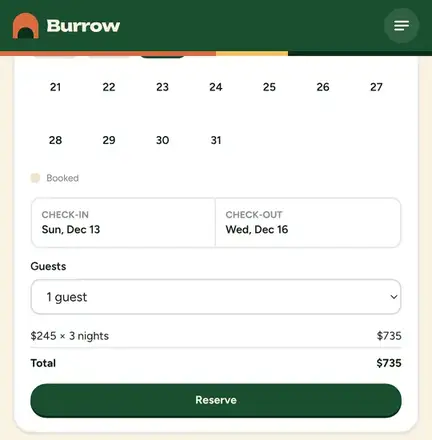
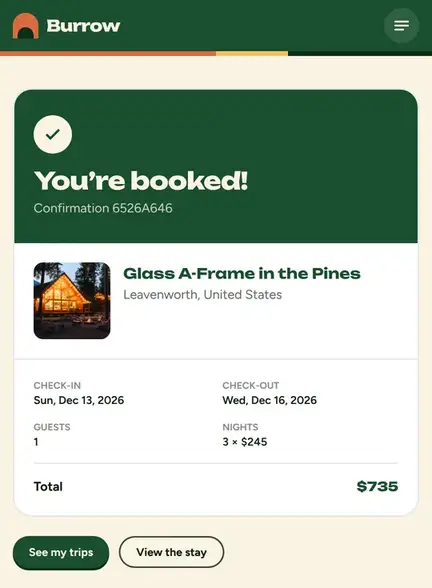
- Real booking on a phone-size screen: we signed up, opened "Glass A-Frame in the Pines" at $245 a night, picked December 13 to 16, and the app showed $245 x 3 nights = $735 before we reserved.
Then we tried to break it, in one continuous take with a second guest account:
- Pasting the first guest's booking link while signed in as the second guest returned a 404 page.
- The same link while signed out redirected to the sign-in page.
- The first guest's nights showed as crossed out on the calendar, and picking a range across them returned "Those dates include booked nights. Pick a shorter stay." with no Reserve button.
- Two guests submitting the same free nights at the same moment did not produce a double booking. The second one got "Some of those nights were just booked. Please pick other dates."
What we did not do in this test matters just as much. Burrow is a mobile-first web app. We did not run the Android or iOS store builds for it, and we have not submitted it to either store. In an earlier test on November 11, a habit tracker build, the "make it work as a mobile app" prompt produced an installable web app (install button on Android, Add to Home Screen steps on iPhone, an offline page), not a native package. The native shells come from the separate mobile build step described above, on a paid plan.
What it costs to make a phone app
Here is the full bill for the AI path, with every number sourced.
| Item | Cost | Notes |
|---|---|---|
| Apple Developer Program | $99 per year | Required to publish on the App Store (Apple) |
| Google Play Console | $25 one-time | Required to publish on Google Play (Google) |
| Totalum Starter | $29 per month, 250 credits | Android and iOS builds, code download, GitHub and custom domain on every paid plan |
| First build of a booking app | 44 credits | Our Burrow build above |
| One mobile build | 13.3 credits reserved | Settled on real build time, refunded if the build fails, queue time never charged |
| Hosting, database and integrations | Billed in credits | From the monthly allowance, with top-ups any time |
So a realistic first-year budget for a simple app on both stores is the $124 in store fees plus your builder plan. Totalum's Free plan gives 50 credits once and 2 projects, which is enough to see whether a first build like ours fits your idea, but mobile builds need a paid plan.
Native shell vs fully native: what you give up
An app that opens your published web app inside a native shell is the fastest path to the stores, and it is how most AI builders ship to phones today. You should know the limits before you choose it:
- Screens are web screens. They look and feel like a well-built mobile site. If your users expect platform-native gestures and animations everywhere, a native or Flutter build will feel better.
- Device features are narrower. What a mobile browser can do, such as photo uploads, is the safe zone. Deep hardware work such as Bluetooth peripherals, AR and background audio is native territory.
- It needs a connection. The shell opens your live app, so heavy offline use is not a fit.
- Store review is stricter on thin apps. Apple's guideline on minimum functionality rejects apps that are just a website in a frame. An app with accounts, a database and real workflows, like a booking flow, is in a much better position than a brochure site.
- Push notifications are not part of the documented mobile build today. Plan on email for reminders.
The upside is a single codebase: you fix a bug once, publish, and both the web app and the phone apps get the fix.
Want to see the mobile build options before you commit? Read the AI mobile app builder page, then start your first app.
Why Totalum for your first phone app
Plenty of tools can produce a demo. Fewer get you from a prompt to signed packages for both stores from the same project. Here is what Totalum gives you on that path:
- A real backend from the first prompt. Accounts, a database and rules like "each user sees only their own bookings" are built in, as our Burrow test showed.
- Android and iOS from the same project. APK, AAB and IPA builds on every paid plan, with "send to stores on publish" handling uploads to the Google Play internal track and TestFlight.
- Your code, not a lock-in. On paid plans you can edit and download the full source, connect GitHub and use your own domain. The stack is Next.js and React on Cloudflare Workers with a D1 database, and Stripe for payments.
- Honest metering. Builds and mobile packages are billed in credits you can see, failed mobile builds are refunded, and per-project caps keep a runaway build from eating your month.
- An API and MCP server on every plan, so an AI agent can create projects, run builds and check logs for you.
If you would rather go through the build phase in more depth first, our walkthrough on how to build an app with AI covers prompting, iteration and launch for web and phone apps alike.
FAQ
How do I create my own phone app?
Write down the one job the app does, describe it to an AI app builder in a detailed prompt, test it at phone size, publish it, then build the Android and iOS packages and submit them from your own Apple Developer and Google Play accounts. With Totalum, our booking app went from prompt to working app in 11 minutes 9 seconds.
Is it free to make a mobile app?
You can try building one for free, but publishing is never free. Apple charges $99 a year and Google charges a $25 one-time fee. Totalum's Free plan includes 50 credits once, which covered our 44-credit first build, but the Android and iOS builds need a paid plan starting at $29 a month.
How hard is it to make a phone app?
With an AI builder, the building part is mostly about writing clear instructions and testing carefully. The harder parts are deciding exactly what the app does and getting through store review. Native development in Swift or Kotlin takes months of learning before a first real app.
Can a 14 year old make an app?
Yes, building an app takes no special age. Publishing is different: the store developer accounts are legal agreements with payment details, so a parent or guardian usually opens and owns them.
Do I need a Mac to make an iPhone app?
Only if you write it natively in Swift, because Xcode runs on macOS. With Totalum, the iOS build runs on build servers, so you can produce the IPA from any computer. You still need an Apple Developer account to sign it and send it to TestFlight.
How long does it take to make a phone app?
Our booking app took 11 minutes 9 seconds to build. Testing, store accounts and review usually take longer than the build itself: plan for at least a few days of store review, and longer on Google Play if your developer account is new and must run a closed test first.
Is an app made with an AI builder a real native app?
On Totalum, it is a native shell installed from the store that opens your published app, not a fully native interface. Base44 describes most AI-generated mobile apps the same way. If you need fully native screens, look at FlutterFlow, Flutter or native code.
Ready to build your phone app?
You have the steps, the real costs and an honest picture of the trade-offs. The fastest way to find out whether your idea works is to describe it and watch it build. Start building your phone app on Totalum, then use the AI mobile app builder options to package it for Android and iOS when you are ready for the stores.