
AI CRM Builder: build your own CRM without code
Describe how you sell. Totalum builds the CRM, with its own database, logins, email and reports.
Quick answer · Updated November 2026
An AI CRM builder turns a plain description of your sales process into a working CRM. Totalum creates contacts, a deal pipeline, tasks, email follow-ups and reports, with its own SQL database and team logins. It suits agencies, brokers and service firms that outgrow spreadsheets. Start free with 50 credits; custom domains and code export start at $29 a month.
What the real estate CRM prompt builds
Data model
| Table | Key fields |
|---|---|
| contacts | name, email, phone, source, owner |
| properties | address, type, price, status, listing agent |
| deals | contact, property, value, stage, expected_close, owner |
| emails | contact, deal, template, subject, sent at |
| tasks | title, due, assignee, status, deal |
| users and roles | name, email, role (agent, admin) |
Screens (5)
- 1
Pipeline board: deals as cards in 7 stage columns, moved by drag and drop, with a filter by agent.
- 2
Contact page: the contact's details, open deals and every follow-up email sent, in date order.
- 3
Task inbox: today, overdue and upcoming tasks for the signed-in agent.
- 4
KPI dashboard: deals won this month, pipeline value by stage and an agent leaderboard.
- 5
Properties: each listing with its photos, price and status, linked to its deals.
Built-in integrations this CRM uses
All included, no API keys.
Email delivery: follow-up emails from templates, logged on the contact and the deal.
AI: Not in the first build, available with a follow-up prompt: built-in AI (for example, summarize a contact's history before a call) and web scraping (fill in a property from a listing URL). Both worked with no keys in our other November 2026 test builds.
File storage: property photos.
Tested on November 11, 2026
We sent the example prompt above, unchanged, to a new Totalum project and timed the build.
- First working version: 17.0 minutes (including about 2 minutes of server setup and the agent's own browser checks)
- Credits for the first build: 36
- Follow-up prompt: "If a deal has no activity for 7 days, create a task for its owner and include it in their morning digest." It took 6.0 minutes and 46.3 credits.
- What the first build had: contacts, properties with photos, a 7-stage drag-and-drop pipeline, tasks, template follow-up emails, a KPI dashboard and roles checked on the server (agents see only their own data).
- Not in the first build: a companies table, a call and note timeline, CSV import, AI features and PDF exports. Ask for them in follow-up prompts.
- The Free plan's 50 credits (given once) cover about one first build like this one, not the follow-up as well.
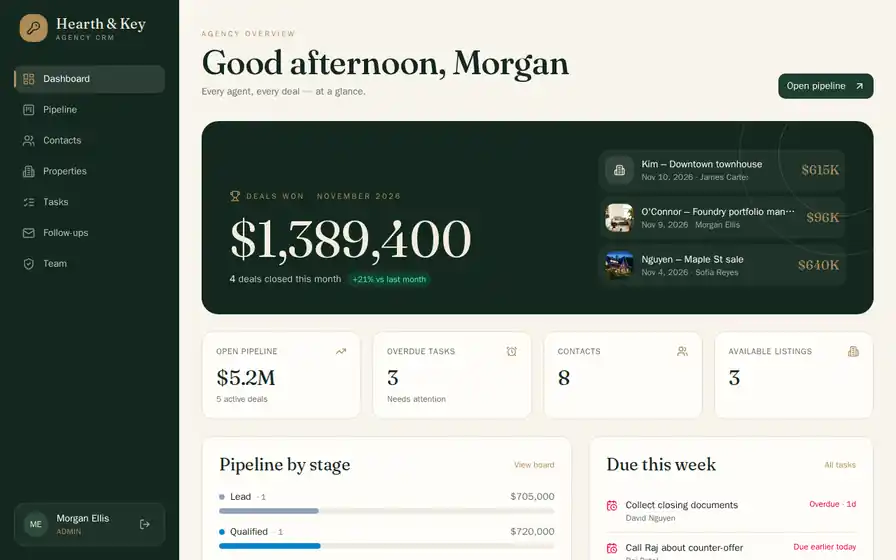
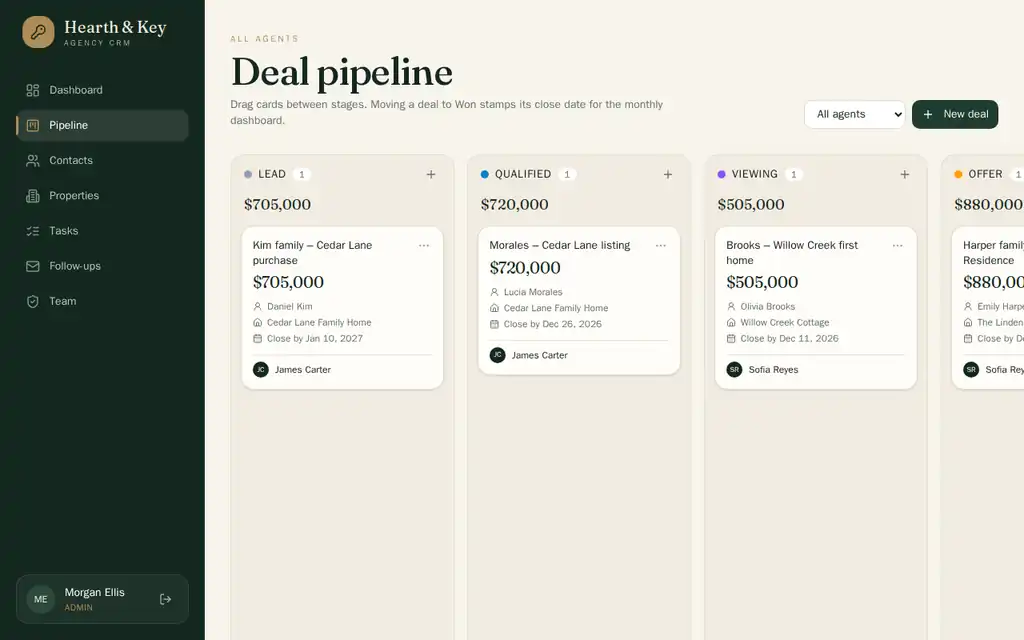
Run through the Totalum API on a test project that was not published. Times and credits vary with the prompt.
Build your CRM in 3 steps
- 1
Paste the prompt.
Start from the example above or describe your own process in your own words: what you sell, the stages a deal goes through, and who should see what.
- 2
Refine it with follow-up prompts.
For example:
- "Add a 'Viewing scheduled' stage between 'Qualified' and 'Offer', and email the contact a confirmation when a deal enters it."
- "If a deal has no activity for 7 days, create a task for its owner and include it in their morning digest."
- "Add a CSV import for contacts that skips rows whose email already exists."
- 3
Publish on your domain.
Publish to a Totalum address on any plan, or connect your own domain (for example crm.youragency.com) on a paid plan. Invite your team with their own logins and roles.
Build a CRM without code
Your pipeline, not a template.
Stages, fields and rules come from your description, not from a vendor's idea of how sales works. A mortgage broker can track "documents received" and "valuation booked"; a recruiter can track "shortlisted" and "placed". When the process changes, describe the change and the agent updates the tables, the screens and the logic together.
Follow-up rules in a sentence.
Built-in email handles the repetitive part: follow-up emails from templates, logged on each contact and deal. New rules come from a sentence. In our test, one follow-up prompt added a task for every deal with no activity for 7 days and a morning digest email for each agent. Sending the digest at a fixed time needs a scheduler that calls the app; in that test the agent set it up for an external scheduler.
Who sees what.
Sign-in and roles are part of the app from the first version. Agents see their own contacts and deals; the admin sees everything. The rules are enforced in the app's server code and database queries, so they hold on every screen, not only in the menu.
A CRM you own.
Each project has its own SQL database, with a panel to view and edit records. You can restore any minute of the last 30 days, and paid plans add a nightly backup of the live database. On any paid plan you can download the full source or sync it to GitHub, so the CRM does not depend on a vendor's roadmap.
AI CRM for real estate
Real estate teams juggle two kinds of records that most generic CRMs keep apart: people and properties. A buyer views three flats, makes an offer on one and asks to hear about anything similar. A seller wants weekly feedback from viewings. In the example prompt, properties are a table of their own and every deal links a contact to a property, so the pipeline shows which property each deal is about.
Useful additions for agencies:
- "Match new properties to buyers whose budget and area fit, and email each buyer a shortlist every Monday."
- "Add a viewing feedback form that agents fill in on their phone after each visit, and send the seller a weekly summary."
- "Let me paste a listing URL and fill in the property's address, price and photos." (uses the built-in web scraping)
Agents get a mobile-friendly web view for the road. On paid plans the same project can also be built as Android and iOS apps: native shells that open the published CRM.
AI CRM builder: Totalum vs HubSpot, Salesforce, Pipedrive, Zoho CRM and Softr
| Totalum | HubSpot | Salesforce | Pipedrive | Zoho CRM | Softr | |
|---|---|---|---|---|---|---|
| Starting paid price (checked Nov 3, 2026) | Starter $29/month per account | Starter $20/seat/month (promo from $7 for new customers) | Starter Suite $25/user/month | Lite $14/seat/month, billed annually | Standard $14/user/month | Basic $25/month ($19 billed annually) |
| Free plan | 50 credits once, 2 projects | Free tools for up to 2 users | Free Suite listed | 14-day trial | Free edition | Free plan, 5 app users |
| Priced per seat or user | No; plans set team-member limits for builders, usage in credits | Yes | Yes | Yes | Yes | Per plan, with app-user limits |
| Data model | Any tables and fields you describe | Their CRM objects, customizable | Their CRM objects, customizable | Their CRM objects, custom fields | Their CRM modules, customizable | Softr databases or a connected source |
| Runs on your own domain | Yes, on paid plans | No, you work in their app | No, you work in their app | No, you work in their app | No, you work in their app | Yes, from Basic |
| Code export | Download and GitHub on paid plans | No | No | No | No | No |
Prices from each vendor's pricing page, read November 3, 2026: hubspot.com/pricing/crm, salesforce.com/sales/pricing, pipedrive.com/en/pricing, zoho.com/crm/zohocrm-pricing.html, softr.io/pricing, totalum.app/en. USD.
HubSpot, Salesforce, Pipedrive and Zoho are mature CRMs with years of features behind them. If your process fits their model, they are a safe choice. A built CRM makes sense when your process does not fit, when per-seat pricing grows faster than your team, or when you want the CRM and its data in a codebase you control.
Comparing Totalum with a specific tool? See all comparisons: honest head-to-head breakdowns against every major AI app builder, no-code platform and coding agent.
Everything else, included
- Own SQL database with 30-day point-in-time restore
- sign-in
- Stripe payments
- file storage
- AI
- custom domain and code export on paid plans
Who uses it
Real estate agencies
buyers, sellers, properties, viewings and offers in one pipeline.
Insurance brokers
policies, renewal dates and the renewals due in the next 60 days.
Recruiting firms
candidates, roles and placements, with a stage for every interview round.
Marketing agencies
leads, proposals and retainers, with a monthly report per client.
B2B service firms
accounts, contacts, quotes and a forecast from the open pipeline.
Training providers
enquiries, course bookings and follow-ups after each cohort.
Loved by builders
“We automated settlements from different e-commerces and data transfer between multiple formats. We edit Excel files with simple commands. We highlight Joan's support throughout the project.”

Annie
Musclecult
“I'm a developer and constantly test new tools. Totalum is one of the most capable on the market. I built a complex project in a week. It generates 80-90% and then you download the code to finish it.”

Nicolás
Freelance Senior Developer
“The tool is intuitive and has helped me optimize my workflow. The team's support is first-class, especially Pol, who took interest in my experience. I recommend trying it.”
Bruno
Freelance
“I had this idea for years but didn't know where to start. With Totalum I created my app in 5 days. It has integrated payments, appears on Google, and I already have paying customers.”

Mario
reformaconecta.com
“I created a portal where my clients see their campaigns in real time: clicks, conversions, spend. Now they log in whenever they want and I charge for access.”

Laura
Marketing Agency
“The system manages 4,000 part references, generates automatic orders when stock drops. We reduced inventory errors by 80%.”
Roberto
Auto Repair
“I tried Bubble, Webflow, Glide, Softr and Framer, but they fell short. With Totalum I turned my idea into a real app in 5 days.”

Francisco
lexflow-ia.com
“We have 12 online courses with videos, tests and automatic certificates. Students pay by card, access the content and receive their diploma. All automatic.”
Elena
Training Academy
“My clients fill in their KPIs in a form, the system generates reports with charts and sends them as PDF automatically.”
David
Financial Consultant
“We automated settlements from different e-commerces and data transfer between multiple formats. We edit Excel files with simple commands. We highlight Joan's support throughout the project.”
Annie
Musclecult
“I'm a developer and constantly test new tools. Totalum is one of the most capable on the market. I built a complex project in a week. It generates 80-90% and then you download the code to finish it.”
Nicolás
Freelance Senior Developer
“The tool is intuitive and has helped me optimize my workflow. The team's support is first-class, especially Pol, who took interest in my experience. I recommend trying it.”
Bruno
Freelance
“I had this idea for years but didn't know where to start. With Totalum I created my app in 5 days. It has integrated payments, appears on Google, and I already have paying customers.”
Mario
reformaconecta.com
“I created a portal where my clients see their campaigns in real time: clicks, conversions, spend. Now they log in whenever they want and I charge for access.”
Laura
Marketing Agency
“The system manages 4,000 part references, generates automatic orders when stock drops. We reduced inventory errors by 80%.”
Roberto
Auto Repair
“I tried Bubble, Webflow, Glide, Softr and Framer, but they fell short. With Totalum I turned my idea into a real app in 5 days.”
Francisco
lexflow-ia.com
“We have 12 online courses with videos, tests and automatic certificates. Students pay by card, access the content and receive their diploma. All automatic.”
Elena
Training Academy
“My clients fill in their KPIs in a form, the system generates reports with charts and sends them as PDF automatically.”
David
Financial Consultant
Frequently asked questions
Can I import my contacts from HubSpot or a spreadsheet?
Yes. Export your contacts from HubSpot, Pipedrive or a spreadsheet as CSV, and ask Totalum to add a CSV import screen that maps the columns to your fields. You can also ask it to skip duplicates by email or to put every imported contact into a "To review" stage.
Do I pay per seat?
No. There is no per-seat or per-contact fee for the people who use your CRM. Your Totalum plan sets how many team members can build and edit projects (3 on Starter, 5 on Builder, 10 on Professional). Hosting, the database and built-in integrations use credits from the monthly allowance, and database records are unlimited, billed on demand.
Can I connect my own domain?
Yes, on any paid plan, starting with Starter at $29 a month. You can use a domain you already own, such as crm.youragency.com, or buy one on Totalum. On the free plan, the CRM is published on a Totalum address.
Can I export the code and host it elsewhere?
Yes, on any paid plan. You can download the full source code or sync the project to a GitHub repository. Viewing the code is free on every plan. The app is a standard Next.js and React project with BetterAuth sign-in.
Does it send emails?
Yes. Email delivery is built in with no keys to set up. Your CRM can send welcome emails, follow-ups, reminders and reports. In our November 11, 2026 test it sent template follow-ups and, after one follow-up prompt, a morning digest. Sending at a fixed time, such as every morning at 8, needed a scheduler that calls the app, which the agent set up for an external service.
Is my data in the EU?
It can be. If you create the project with EU data residency, its data stays inside the EU. Otherwise data is placed near your users. Each project has its own SQL database. You can restore any minute of the last 30 days, and paid plans back up the live database every night.
Can the CRM write emails or summaries with AI?
Not in the first build from the example prompt. AI is built in, so you can ask for it in a follow-up prompt, for example to summarize a contact's history before a call or draft a reply to the last email. You don't need an AI provider account or key.
Can my team use it on their phones?
Yes. The CRM is a web app that works in any mobile browser. On paid plans you can also build Android and iOS apps from the same project. They are native shells that open your published CRM, and builds are billed in credits.