
Booking Website Builder: your own booking system, on your domain
Describe your services and opening hours. Totalum builds the booking site, with card deposits and email confirmations.
Quick answer · Updated November 2026
A booking website builder gives you an online booking page that clients use to pick a service, a time and pay. Totalum builds a booking system you own: services, staff availability, Stripe card deposits and email confirmations, on its own database. Totalum takes no commission per booking; Stripe's card fees apply. Paid plans with your domain start at $29.
What the clinic booking system includes
Data model
| Table | Key fields |
|---|---|
| services | name, duration, price, deposit amount, buffer time |
| staff | name, specialties, photo, active |
| availability | staff, weekday, from, to, exceptions (holidays) |
| bookings | client, service, staff, start, end, status, deposit paid |
| clients | name, email, phone, notes |
| reminders | booking, send_at, type (confirmation, 24h reminder), sent |
Screens (2)
- 1
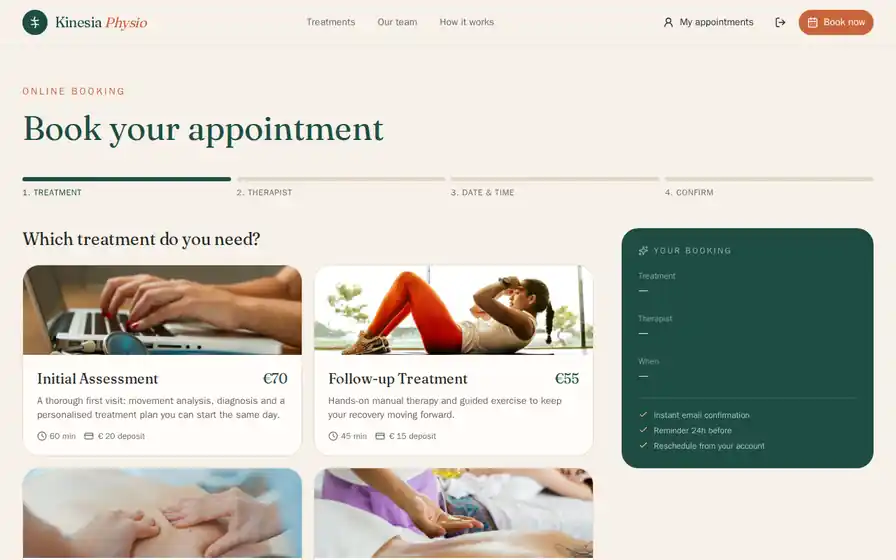
Public booking page: choose a treatment, then a therapist or "any", then a free slot, then sign in or sign up. Double bookings are blocked, and the deposit is paid by card once your Stripe account is connected.
- 2
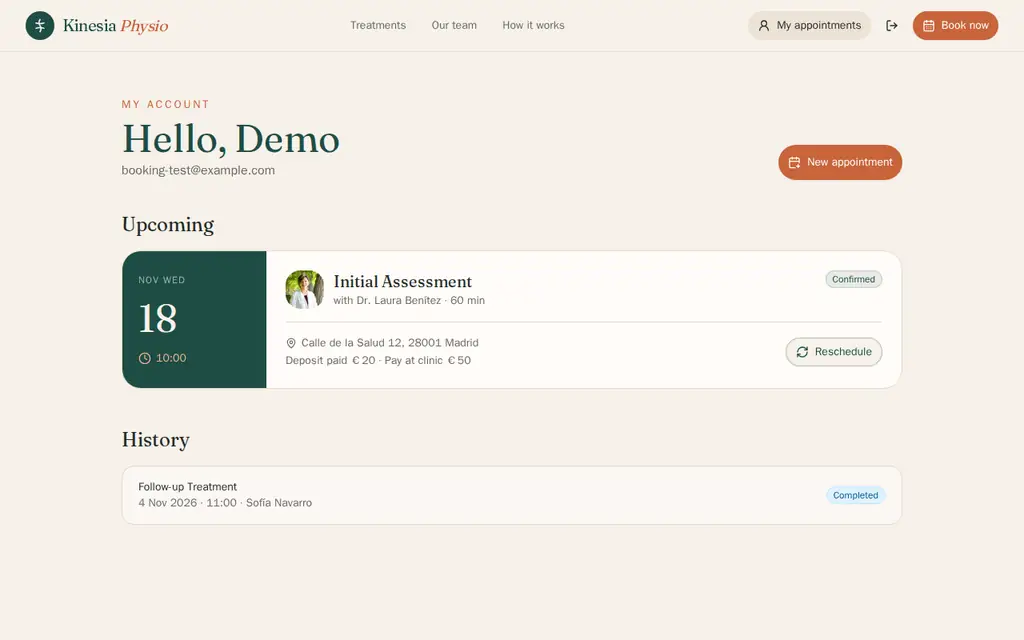
Client account: upcoming visits, with rescheduling up to 12 hours ahead.
Services, therapists and bookings are managed in the project's database panel. A staff calendar, a booking management screen and a revenue dashboard were not in the first build; ask for them in follow-up prompts.
Built-in integrations used
Stripe payments: deposits at booking, paid into your clinic's Stripe account once you connect it. Until then, bookings are confirmed with the deposit marked "pay at clinic".
Email: the booking confirmation, sent the moment a booking is made, and a 24-hour reminder, which needs a scheduler that calls the app to go out on time.
Sign-in: client accounts.
Tested on November 11, 2026
We sent the example prompt above, unchanged, to a new Totalum project and timed the build.
- First working version: 14.4 minutes (including about 2 minutes of server setup and the agent's own browser checks)
- Credits for the first build: 36.6
- Follow-up prompt: "Leave 10 minutes between appointments and don't allow bookings less than 2 hours ahead." It took 4.2 minutes and 43 credits.
- What the first build had: services with duration, price and deposit, therapists with weekly availability (including split shifts), a 4-step booking flow with double bookings blocked, an email confirmation sent at once, and a client account to reschedule up to 12 hours ahead.
- Card deposits: the build asked for a Stripe secret key; without it, bookings were confirmed with the deposit marked "pay at clinic".
- Not in the first build: a staff calendar, a booking management screen, a revenue dashboard and a daily schedule email.
- The Free plan's 50 credits (given once) cover about one first build like this one, not the follow-up as well.
Run through the Totalum API on a test project that was not published. Times and credits vary with the prompt.
Build it in 3 steps
- 1
Paste the prompt.
Use the example, or list your services with their length and price, who delivers them and when you're open.
- 2
Refine with follow-up prompts.
For example:
- "Leave 10 minutes between appointments and don't allow bookings less than 2 hours ahead."
- "If a client cancels less than 24 hours before, keep the deposit; otherwise refund it."
- "Add a waitlist: when a slot frees up, email the first client waiting for that service."
- 3
Publish on your domain.
Publish to a Totalum address, or connect book.yourclinic.com on a paid plan. Connect your Stripe account to take card deposits.
No commission on your bookings.
Many booking platforms charge per team member or per booking, or limit the bookings included in each plan. Your own booking system has no per-booking fee from Totalum. You pay your plan and the credits your app uses, plus Stripe's standard card fees on the deposits you take.
Deposits that cut no-shows.
A deposit at booking is the simplest no-show policy there is. Checkout runs on Stripe, and the rules are yours: a fixed amount or a percentage, which services need it, when it is refunded. In our test build, the deposit needed your Stripe secret key; without it, bookings were confirmed with the deposit marked "pay at clinic".
Confirmations and reminders by email.
The confirmation email goes out the moment a booking is made. A 24-hour reminder was built too: in our test it went out when someone used the site, and sending it reliably on time needs a scheduler that calls the app, which the agent set up for an external service. Change the timing or the wording with one prompt.
Rules that fit how you work.
Off-the-shelf tools give you their options. Here, the booking logic comes from your description: buffers between sessions, a first-visit service only for new clients, a therapist who works mornings on Tuesdays only, packs of 5 sessions paid upfront. If you can describe the rule, the agent can build it.
Booking website builder: Totalum vs Calendly, Calendesk, SimplyBook.me, Square Appointments and Fresha
| Totalum | Calendly | Calendesk | SimplyBook.me | Square Appointments | Fresha | |
|---|---|---|---|---|---|---|
| Starting paid price (checked Nov 3, 2026) | Starter $29/month per account | Standard $10/seat/month (billed yearly) | Standard $97/month ($79 billed annually) | Basic $13.90/month ($11.90 billed annually) | Plus $49/month per location | Independent $19.95/month |
| Free plan | 50 credits once, 2 projects | Yes, 1 event type | 14-day trial | Yes, 50 bookings a month | Yes, $0 per location | 7-day trial |
| Per-seat, per-location or booking limits | No booking fee or limit from Totalum; usage in credits | Per seat | 5 employees and 750 bookings a month on Standard | 100 bookings a month and 5 providers on Basic | Per location | Team plan: $14.95 per bookable team member |
| Card payments or deposits | Yes, Stripe deposits into your account | Stripe or PayPal on Standard | – | Payments and deposits available | Yes; online 3.3% + 30¢ on Free | Yes, with processing fees; one-time fee for new clients from its marketplace |
| Your own domain | Yes, paid plans | – | 1 website on Standard | – | – | – |
| Code export | Download and GitHub on paid plans | No | No | No | No | No |
Read on each vendor's pricing page on November 3, 2026: calendly.com/pricing, calendesk.com/pricing, simplybook.me/en/pricing, squareup.com/us/en/appointments/pricing, fresha.com/pricing, totalum.app/en. USD (Fresha and Square in their US view).
Note: Calendly is built for meeting scheduling; Square and Fresha bundle point of sale and, for Fresha, a consumer marketplace that can bring new clients. If you want a ready tool, they are good options. Build your own when per-seat or per-booking costs add up, when your rules don't fit their settings, or when you want the booking site on your domain with your own client data.
Everything else, included
- Own SQL database with point-in-time restore for the last 30 days
- sign-in and roles
- Stripe payments into your own account
- email delivery
- file storage
- built-in AI
- custom domain and code download on paid plans
Who uses it
Physio and health clinics
therapists, treatment types, deposits and reminders.
Hair and beauty salons
stylists, service menus and rebooking from the client account.
Fitness studios and personal trainers
class capacity, session packs and waitlists.
Tutors and music teachers
weekly slots, recurring lessons and prepaid blocks.
Workshops and repair services
drop-off slots with a deposit and a status page.
Coworking spaces
meeting rooms by the hour, paid by card at booking.
Frequently asked questions
Can clients pay a deposit when booking?
Yes. The booking flow can open a Stripe checkout for a deposit or the full price, and the money goes into your own Stripe account once you connect it. You decide which services need a deposit, how much it is and when it is refunded.
Do you send reminders?
Yes, by email. Email delivery is built in, so the system sends a confirmation when the booking is made. A reminder such as 24 hours before can be built too; in our November 11, 2026 test, sending it reliably on time needed a scheduler that calls the app. SMS is not a built-in channel.
Can I have several staff calendars?
Yes. Each staff member gets their own weekly availability, including split shifts, and clients can pick a person or the first one available. A calendar view per staff member and staff logins were not in the first build from the example prompt; ask for them in a follow-up prompt.
Is there a fee per booking?
Not from Totalum. Your booking system has no per-booking commission or booking cap. Your plan's credits cover hosting, the database and emails. Stripe charges its standard card fees on any payment you take.
Can it sync with Google Calendar?
Not as a built-in integration. Bookings live in your app's own database and calendar views. If you need a two-way sync with Google Calendar, you can ask the agent to add it using your own Google API credentials, stored as project secrets. Test it before you rely on it.
Can clients reschedule or cancel on their own?
Yes. With client accounts, each client sees their upcoming bookings and can reschedule them within the rules you set; in our test, up to 12 hours before. Self-service cancellation and an email to staff can be added with a follow-up prompt.
Can I use my own domain for the booking page?
Yes, on any paid plan from $29 a month. You can use a domain you already own, such as book.yourclinic.com, or buy one on Totalum. The free plan publishes on a Totalum address.